
F4SD® Interfaces
F4SD Interfaces – Seamlessly Integrated, Optimally Connected
F4SD integrates with a wide range of systems to significantly improve efficiency in first-level support. Thanks to direct interfaces with Matrix42, Microsoft Teams, Microsoft Intune, TAPI (telephony integration), Nexthink, and the Service Desk, centralized, end-to-end processing of tickets, device information, and communication tasks is possible—right within the F4SD Cockpit. All information is available at a glance, which accelerates support processes and increases user satisfaction.
Matrix42 & F4SD
Seamless ticket management: With F4SD, you can also optimize ticket management with Matrix42: Our integration bridges the two platforms and enables the systems to work together effectively.
F4SD as Your Ticket Documentation Assistant – Features and Capabilities:
- Immediate display of a user's current tickets
- Ticket summary in the F4SD Cockpit with relevant information directly from Matrix42
- Create a new ticket or edit an existing ticket directly via F4SD in Matrix42
- Automatic logging of all actions in F4SD (Quick Action History) and automatic population of all relevant fields in the Matrix42 ticket
- Function to close, save, pause, and forward an existing Matrix42 ticket via F4SD
- Ability to link tickets with Matrix42's asset management and service management
- You can jump directly from Matrix42 to F4SD
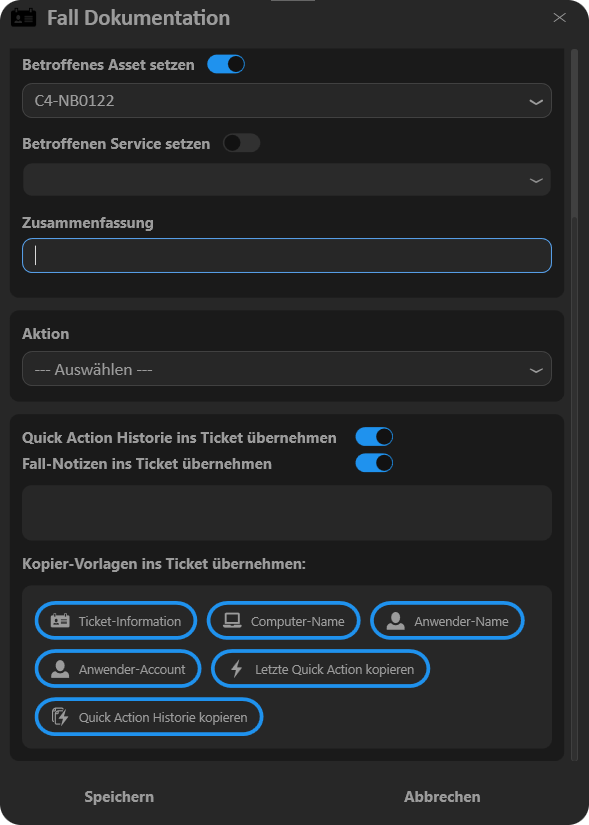
Added Value: Matrix42 & F4SD
- Speeding up and streamlining ticket processing leads to increased motivation and improved quality. It also reduces error rates and the number of returned items, and documentation is partially automated.
- Instead of having to juggle multiple applications, IT support staff can handle issues and tickets entirely within a single tool.
Microsoft Teams Integration & F4SD
More and more phone systems are being replaced by Microsoft Teams. F4SD integrates the necessary interface to identify PSTN calls and display relevant data directly. This allows the caller’s name and associated client data to be displayed immediately when a call comes in, enabling quick interaction via F4SD.
For example, when a PSTN call comes in via the Teams phone system, a browser window opens displaying the caller's information. From there, the support agent can jump directly to the F4SD interface to view additional details and take action.
Roadmap – Coming soon:There will also be a direct link to the F4SD Cockpit for incoming calls made directly through Teams (not PSTN). In this case, the link will be via the call chat in Teams, where the F4SD app is integrated as a button. Similarly, the app will be available in Teams chats, enabling support staff to jump directly to F4SD even when contacted via Teams in writing.
Benefits: Microsoft Teams Integration & F4SD
- F4SD's Teams integration enables the display of relevant client data even when contacting clients via Teams phone systems—whether through calls or text-based chats.
- In accordance with the TAPI interface, support staff have all the information about the user making the inquiry at a glance and can immediately initiate all necessary steps to resolve potential issues in F4SD.
- Increased speed, transparency, and efficiency in receiving and processing trouble tickets via Teams and Teams telephony (PSTN).
Microsoft Intune & F4SD
Microsoft Intune provides centralised functions for managing and monitoring mobile devices and applications. Through the F4SD-Intune interface, data on devices and their status information is seamlessly integrated and displayed in the F4SD Cockpit. This allows support staff to view key information from Intune directly within F4SD and use it specifically for incident resolution—without needing separate access to the Intune console.
In addition, Quick Actions can be performed based on Intune data, for example, to restore compliance status.
Benefits: Microsoft Intune & F4SD
- Key Intune information is available directly in the F4SD Cockpit, without the need to access the Intune console separately.
- Support staff can perform targeted actions directly through F4SD, which reduces response times to issues.
- This integration simplifies processes by making all relevant device data and quick actions accessible in one place.
Telephony Integration (TAPI) & F4SD
Integration with the phone system further simplifies the process. It enables the immediate and automatic assignment of a caller to the corresponding client. This means that when a user calls the support hotline, a corresponding pop-up from F4SD automatically opens, displaying the phone number, name, and associated devices. The same works the other way around: Even when a help desk agent calls a user, the relevant data is retrieved via the TAPI interface and displayed.
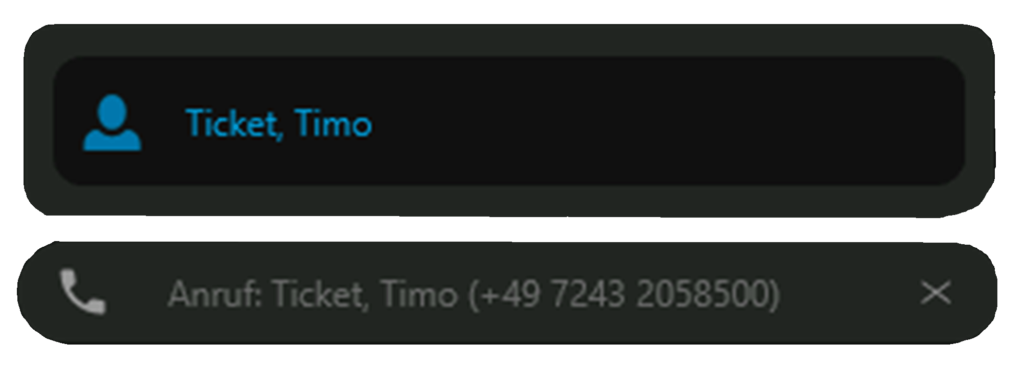
Added Value: TAPI & F4SD
- There’s no need for tedious back-and-forth or typing in a name to locate the client—the support representative can immediately see who they’re speaking with and, if necessary, which devices are involved. This allows them to take immediate action and resolve issues more quickly.
- In addition to further improving efficiency in first-level support, this increases user satisfaction and, as a result, the overall image of IT.
Nexthink & F4SD
In-depth analysis and troubleshooting: The combination of Nexthink’s comprehensive client-side analysis capabilities and the clear summary of the resulting data in F4SD provides IT support with an expanded and highly detailed view of client data. The data from Nexthink is displayed in the F4SD Cockpit and can be visualized directly using corresponding traffic light colors. This enables first-level support staff to identify the causes of issues more quickly when necessary or draw even better conclusions about existing issues.
Note: The combination of F4SD and Nexthink works only when Nexthink is used as an on-premises solution.
Benefits: Nexthink & F4SD
- Improved analyses based on a broader range of information provide a significant knowledge advantage.
- Thanks to deeper insights into client data, issues can be resolved more quickly and efficiently.
- The ability to perform proactive application monitoring and global trend analysis also makes F4SD a valuable tool for problem management.

Carlos Kohl
Our Head of Product Management is happy to answer any questions you may have about F4SD.