
F4SD® Features
The Benefits of F4SD®
Root cause analysis
A solution in seconds
Standardization
Integrated ticket processing
Less back-and-forth, less hassle
Improvement in key performance indicators
Root cause analysis
In the F4SD Cockpit, support staff can view all relevant details regarding the client’s health status in real time. The assessment of individual parameters using traffic light colors allows them to identify the cause at a glance.
A solution in seconds
Whether it's "Clear Teams Cache" or "Collect Log Files," the predefined Quick Actions provide effective options for immediate assistance with common issues. You can also add your own PowerShell scripts at any time.
Standardization
No matter where or who—support staff can work within the same tool using a standardized process and following established workflows. The integrated TAPI interface and Microsoft Teams integration play a key role in this.
Integrated ticket processing
Features such as copying all client information and displaying it when performing Quick Actions simplify ticket processing and documentation. With the Matrix42 interface, it’s even easier: create, open, edit, or close tickets directly in F4SD.
Less back-and-forth, less hassle
For more complex issues, tickets can be assigned directly to the appropriate second-level team—complete with all relevant information—thanks to a clear analysis of the root cause. This reduces misrouting and saves time.
Improvement in key performance indicators
F4SD enables the IT department to improve key performance indicators (KPIs) by boosting first-call resolution rates, reducing handling times and error rates, and resolving user issues more quickly. As a result, you enhance the IT department’s effectiveness, recognition, and standing.
Quick Actions
F4SD comes with predefined Quick Actions right out of the box, and you can add more as needed. The selection of included Quick Actions is constantly being expanded.
Currently included Quick Actions
- Quick Action: Copy History
- Copy ticket information
- Copy Computer Name
- Copy user name
- Copy Account Name
- Edit AD Computer Object
- Edit AD User Object
- Clean up your hard drive
- Show connected printers
- Start the Empirum Poll
- Update Group Policy
- Quick Start: Read Status
- Enable Quick Start
- Turn off Quick Start
- Open an MS Teams chat with a user (web)
- Open an MS Teams chat with a user (Teams)
- Open Remote Tool with user parameters
- Empty the trash
- Clear Teams Cache
- Clear DNS cache
- Restart the device
Also includesa Matrix42 interface:
- Create a ticket
- Ticket Preview
- Edit ticket
- Close ticket
Chaining Quick Actions
Individual Quick Actions can be chained together to create an automated sequence of specific actions. This can further speed up troubleshooting and fault resolution. These chains can be created on a case-by-case basis. Certain standard chains are included in the initial delivery and can be used as needed.
Example: First-level support uses a remote Quick Action to collect log files from the affected end-user’s computer. The F4SD Agent then places the collected files in a folder and returns the corresponding file path. To enable the first-level support staff member to use the log files, a second, local Quick Action is executed. This opens the returned file path on the help desk staff member’s computer.
In other words:Thanks to chaining, thecollection, storage, and opening of log files now take place fully automatically, one after the other—all with a single click and in a matter of seconds. The advantage: Manual and time-consuming individual steps are eliminated, making troubleshooting even faster and more effective.
PERFORMANCE MONITOR
ROI Calculation and Performance Measurement: The F4SD Performance Monitor enables the display of anonymized, data-driven information based on a Power BI table—for example, regarding how often employees at the service desk access and use the application. Also available: the top ten most frequently used Quick Actions, the number of incidents resolved per time period, and other metrics relevant for a well-founded ROI calculation. The table is intended for evaluation by IT administrators or IT management. This enables a concrete ROI calculation for F4SD at the management level and makes the improvements achieved objectively measurable and visible.
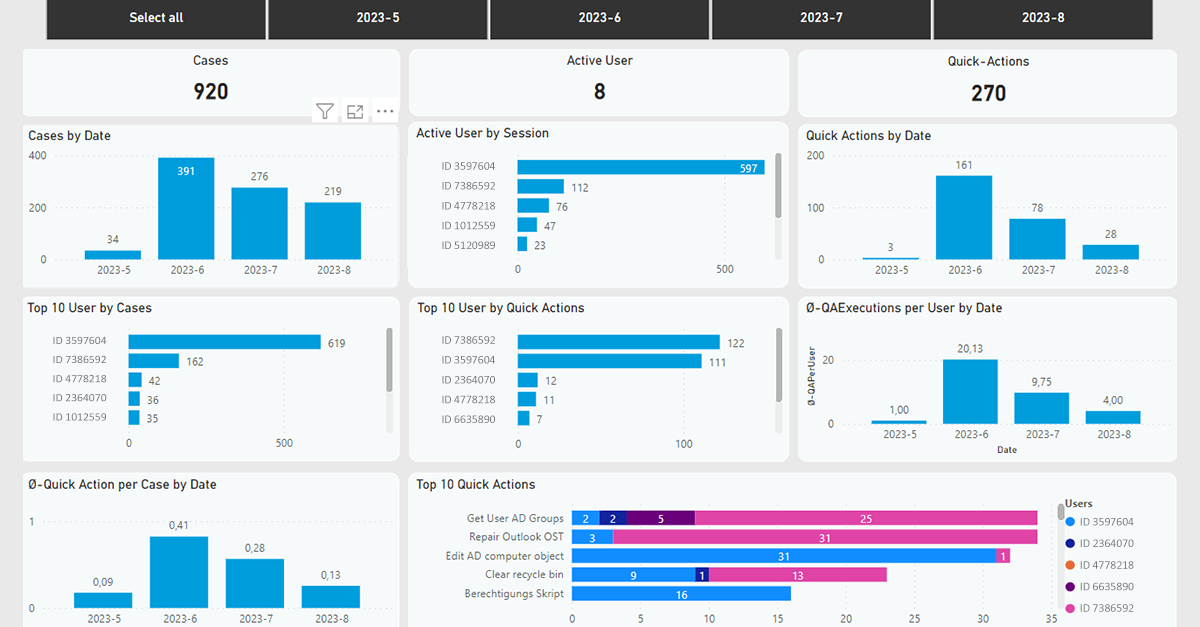
The Performance Monitor answers the following questions:
- Is the tool being used to its full potential and equally by all support staff?
- Are existing Quick Actions being used?
- Which Quick Actions are used, and how often?
- How many issues are handled and resolved during which time periods
- When are the peak times for handling service requests?
This approach not only helps identify potential training needs but also enables the identification of further process improvements or actions within first-level support. Important: The figures provided regarding employees are 100% anonymous and are presented using non-identifiable ID numbers.
Technical Details
F4SD Client Agent
The so-called “F4SD Client Agents” transmit client and user data to the F4SD Cockpit’s central SQL database. To this end, they are deployed throughout the company and can be connected to the central server via VPN or the Internet.
The collected information is standardized so that the same information content can be used as a foundation in every customer environment.
System Requirements
A Microsoft SQL Server:
- Version 2016 / 2017 / 2019
- At least 50 GB of free disk space / 5,000+ clients require at least 200 GB
- At least 8 GB of RAM / 5,000+ clients require at least 32 GB of RAM
- At least 4 processors; 5,000+ clients require at least 6 processors
- Full-text search installed and enabled
A Windows Server with Internet Information Server installed (exclusive):
- Version 2016 / 2019 / 2022
- At least 100 GB of free disk space
- At least 8 GB of RAM / 5,000+ clients require at least 16 GB of RAM
- At least 4 processors
- .NET Framework 4.8 (including ASP.NET)
- Basic Installation of Internet Information Server
- Server-side certificate
Technical users:
- Native SQL users for accessing the database
- An AD user (with standard user permissions) for accessing the database and Active Directory information
F4SD Client Agent
- Requires Windows 10 / Windows 11
- (Fat Client) 64-bit
- The hardware requirements for the agent are the same as those for the supported operating system versions.
- 2–3 clients for a test installation of the agent
Installation User:
- SQL Server: Connect to SQL and create any database
- IIS Server: Local Administrator

Carlos Kohl
Our Head of Product Management is happy to answer any questions you may have about F4SD.